Instances, your way
Keep every setup separate. Create, duplicate and tweak instances without one modpack breaking another.
Modal is a clean, modern launcher for Minecraft: Java Edition. Spin up instances on any loader, discover mods, modpacks and shaders, and jump straight back into your worlds.
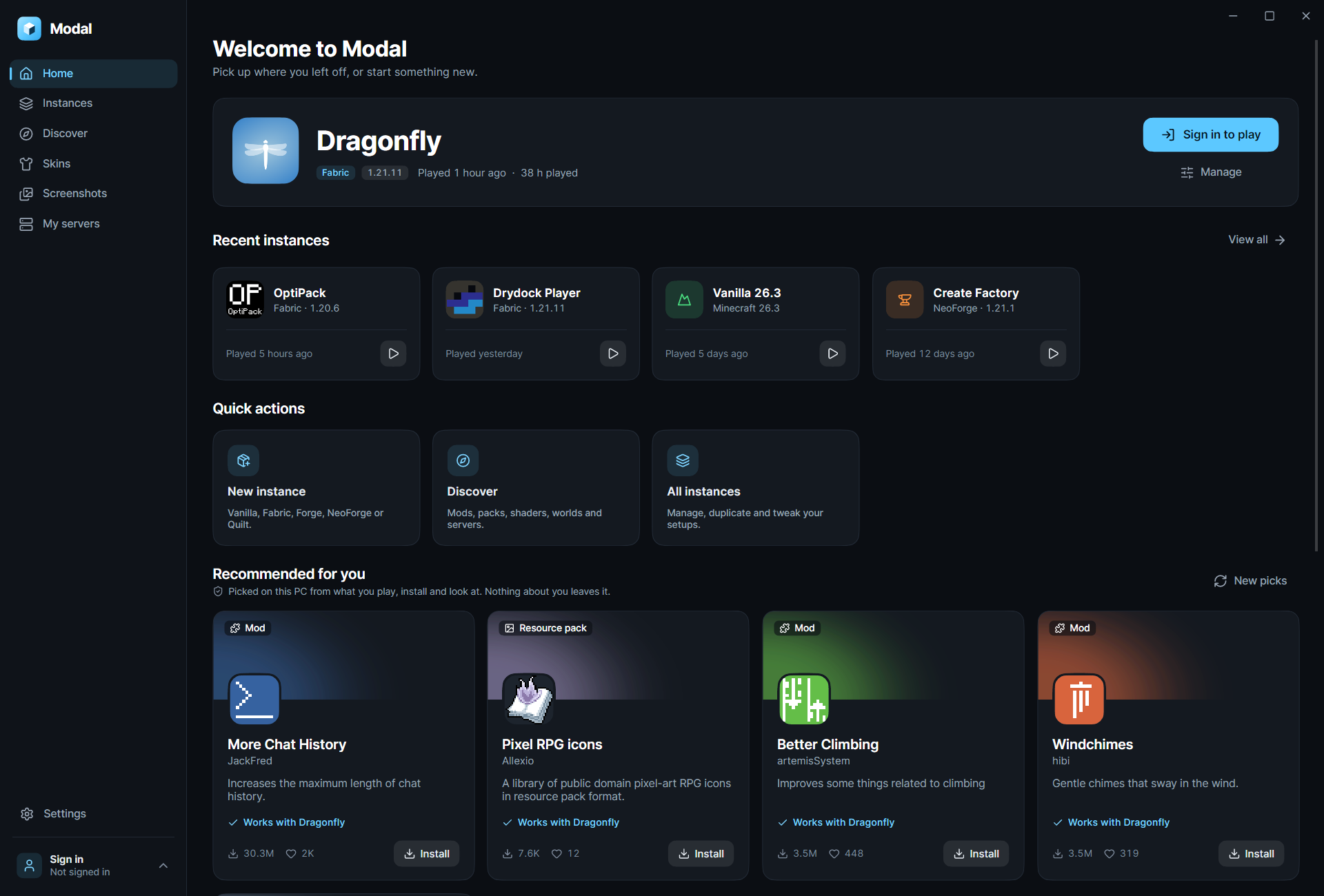
Modal keeps the parts of Minecraft you love front and centre, and tucks the busywork out of sight.
Keep every setup separate. Create, duplicate and tweak instances without one modpack breaking another.
Pick a loader and version. Modal handles the rest.
Mods, modpacks, shaders, resource packs, worlds and servers, all searchable from one place and installed straight into an instance.
Swap your look without opening a browser, or wear one of the skins Modal comes with. Try one below.
Your last instance waits on the home screen. One click and you're back in.
Clone an instance before trying a risky mod. Keep the one that works.
Sign in with the Microsoft account that owns Minecraft: Java Edition.
Modal suggests mods, modpacks and resource packs based on what you play, install and look at, and it works all of that out right on your PC.
Download the installer and open the launcher.
Add the Microsoft account that owns Minecraft: Java Edition.
Make an instance or grab a modpack, then hit Play.
Something else on your mind? The answer is probably one launch away.
Yes. To play, sign in with the Microsoft account that owns Minecraft: Java Edition.
You can create Vanilla, Fabric, Forge, NeoForge and Quilt instances, each on the version you choose.
Modal looks at what you play, install and browse, and picks suggestions on your PC. Nothing about you leaves it. Use New picks to shuffle them anytime.
That's what instances are for. Each one has its own loader, version and content, and you can duplicate one to experiment safely.
No. Modal is an independent launcher and is not approved by or associated with Mojang or Microsoft.

Modal is coming soon, free and open source, to bring every world, mod and modpack under one roof.
Coming soon to macOS, Linux and Windows Requires Minecraft: Java Edition


 Better Selection
A utility mod
Better Selection
A utility mod
 OptiPack
A lightweight modpack
OptiPack
A lightweight modpack
 Pixel RPG icons
A GUI resource pack
Pixel RPG icons
A GUI resource pack